GridHoster.com
  • 0 Shopping Cart
  • Home
  • Store
    • Browse All
    • Hosting
    • SSD Cloud Server‎s
    • Register a New Domain
    • Transfer Domains to Us
  • Announcements
  • Knowledgebase
  • Network Status
  • Contact Us
  • More
  • Account
    • Login
    • Forgot Password?
  1. Portal Home
  2. Knowledgebase
  3. Getting Started
  4. Force HTTPS Redirection

  Categories

DNS & Name servers
4
Getting Started
22

  Categories

  Tag Cloud

backup cpanel recovery full backup ftp file upload download bandwidth disk usage disk space free space add domain add-on domain add website add subdomain subdomain domain parking parking park edit dns edit dns zone dns zone editor srv record add record imap pop3 smtp mysql mysql database database db add db add database remote sql remote mysql add email email email account create website website webpage site builder easy web site builder builder publisher backup website make backup error pages custom error 404 401 cron job create a cron cron schedule http https force https secure site redirect password password protect protect folder

  Support

My Support Tickets
Announcements
Knowledgebase
Downloads
Network Status
Open Ticket

Force HTTPS Redirection Print

  • cpanel, http, https, force https, secure site, redirect
  • 102

HTTPS Redirection

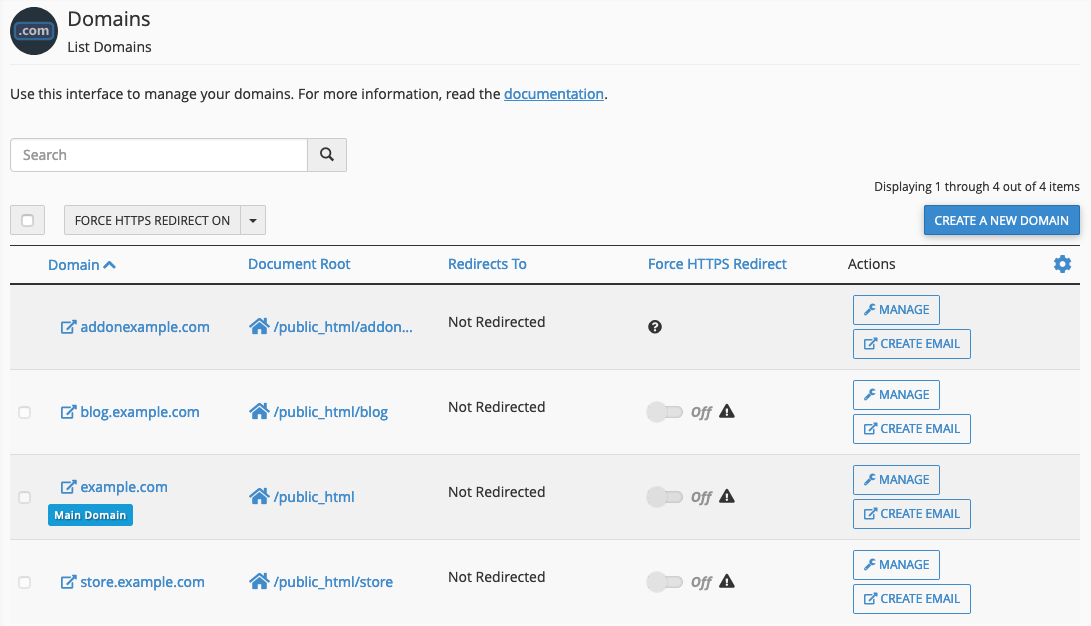
In the Domains interface in cPanel (Home >> Domains), there’s an option to enable Force HTTPS Redirection from the insecure version (HTTP) to the secure version (HTTPS) with a toggle switch. 

Was this answer helpful?

Related Articles

Access to the Control Panel (cPanel) cPanel is a web hosting account management toolYou only get one username per cPanel. If you... Access to the Easy Web Site Builder To access to the Easy Web Site Builder that contains over 1000 ready-to-use templates are now... How to Check Bandwidth Step 1. Access a Short Summary of Bandwidth Usage When you log in, you can immediately see the... Creating a Subdomain How to Create a Subdomain Log into cPanel. In the Domains section, click on the Subdomains... How to Configure Dreamweaver for FTP How to Configure Dreamweaver for FTP If you are using Dreamweaver as your site designer, you...
« Back

  Tag Cloud

backup cpanel recovery full backup ftp file upload download bandwidth disk usage disk space free space add domain add-on domain add website add subdomain subdomain domain parking parking park edit dns edit dns zone dns zone editor srv record add record imap pop3 smtp mysql mysql database database db add db add database remote sql remote mysql add email email email account create website website webpage site builder easy web site builder builder publisher backup website make backup error pages custom error 404 401 cron job create a cron cron schedule http https force https secure site redirect password password protect protect folder

  Support

My Support Tickets
Announcements
Knowledgebase
Downloads
Network Status
Open Ticket
Hosting
  • Web Hosting
Services
  • SSD Cloud Hosting
  • SSD Cloud Servers
  • SSD VPS Hosting
  • Web Hosting
  • Domain Names
Company
  • About Us
  • Knowledge Base
  • Announcements
  • Contact Us
Clients
  • Login
  • Register
  • Affiliates
  • Submit a Ticket
  • Password Recovery
Manage
  • View Emails
  • View Quotes
  • View Invoices
  • Products & Services
  • Domain Management
Legal
  • Privacy Policy
  • Terms of Service
  • Report Abuse

© 2026 — GridHoster.com — All Rights Reserved


Loading...
Loading...
Choose language
العربية
Azerbaijani
Català
中文
Hrvatski
Čeština
Dansk
Nederlands
English
Estonian
Persian
Français
Deutsch
עברית
Magyar
Italiano
Macedonian
Norwegian
Português
Português
Română
Русский
Español
Svenska
Türkçe
Українська

Generate Password

Please enter a number between 8 and 64 for the password length